Features of the DTU-1141B
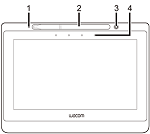
ExpressKeys: You can assign functions, keystrokes, button clicks, and modifier keys to ExpressKeys. When you press an ExpressKey, it acts as a shortcut to the function that you assigned to it.
Pen storage: Use the compartment on the top edge of the pen display to store the pen when it is not in use.
Pen stand: Use the pen stand to safely store your pen while you are working.
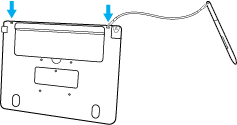
Pen tether anchor slots: Insert the pen tether into one of these slots and slip the pen through the loop to attach it to the right or left side of your pen display.
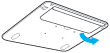
- Display stand: Fold out this built-in stand to prop up your pen display at an angle for easier viewing.
- You can also attach an arm to the VESA mounting holes.
Power LED: The Power LED is next to the pen storage. The Power LED lights blue when the pen display is on and a video signal is detected.
Port for the Split–Y USB cable: The port for the Split–Y USB cable is on the top left-hand edge of the pen display.
Kensington Security Slot: This slot is located on the right edge of the pen display. It can be used to attach a locking cable to secure your pen display to a specific location, like your desk.

 |
|
 |
|
Check out what is included with the DTU-1141B.
| | Do not share my information | | Cookies | | Terms of use | | Privacy Policy |