Features
The controls of your MobileStudio Pro include:
- Customizable ExpressKeys: Six or eight keys on the front of the pen display allow you to set frequently used functions or keystrokes, simulate button clicks or modifier keys, or create automatic settings for a number of applications. See Customizing the ExpressKeys and About your MobileStudio Pro.
- Touch Ring: The four-mode Touch Ring allows you to further customize your functions. You can configure the Touch Ring with up to four different modes. See Touch Ring for more information.
The front and rear illustrations show the features of your pen display. For a general description of your device, see About your MobileStudio Pro.
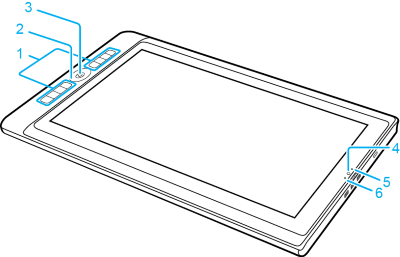
| Number | Item |
|---|---|
| 1 | ExpressKeys |
| 2 | Touch Ring |
| 3 | Center button/Fingerprint scanner |
| 4 | Front camera |
| 5 | Camera LED |
| 6 | Light sensor |
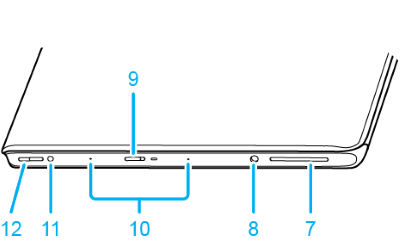
| Number | Item |
|---|---|
| 7 | SD Port |
| 8 | Headphone/Mic combo jack |
| 9 | Power button |
| 10 | Microphone |
| 11 | Auto-Rotate Switch |
| 12 | Volume Up/Down buttons |
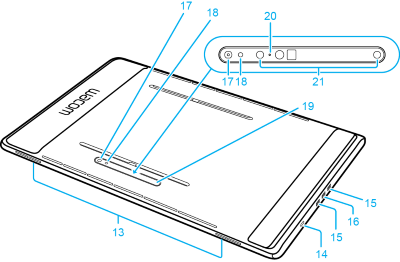
| Number | Item |
|---|---|
| 13 | Speakers |
| 14 | Kensington Security Slot/hole for pen holder |
| 15 | USB-C Port |
| 16 | USB-C Port for Desktop Mode connection |
| 17 | Rear camera |
| 18 | Rear camera LED |
| 19 | Stand attachment grooves |
| 20 | Rear 3D camera LED |
| 21 | Rear 3D camera |
| | Do not share my information | | Cookies | | Terms of use | | Privacy Policy |