Stand setup and usage
To attach the Easy Stand included with your Cintiq Pro 17, use the instructions below. To attach another VESA-compliant stand, use the VESA mounting holes on the back of your Cintiq Pro.
Important: The Wacom Cintiq Pro 17 is designed to be used with the included Easy Stand (instructions below), the Wacom Cintiq Pro 17 Stand (available on the Wacom eStore), or a third-party stand or arm that complies with the VESA 75mm x 75mm standard.
Warning: Using this product without a stand may damage the ExpressKeys and cause injury due to instability during use. Please be sure to use this product with a stand as instructed.
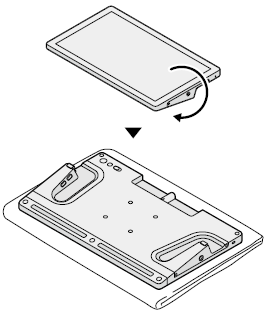
- Place the Cintiq Pro screen-side down onto a soft cloth.
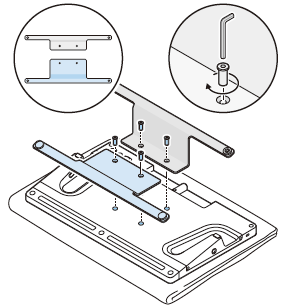
- Attach the Easy Stand to the VESA mounting holes using the 4 screws and the hex wrench included with your Cintiq Pro.
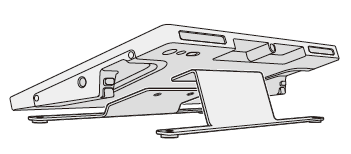
- Turn the Cintiq Pro upright.
Important: Attach the wider stand piece (highlighted in blue) to the bottom of the Cintiq Pro.
| | Do not share my information | | Cookies | | Terms of use | | Privacy Policy |