
About Wacom One
Note: "Wacom One" refers to both the Wacom One S and the Wacom One M.
Your Wacom One helps you express yourself creatively and is a great tool for working or learning from home. Use the pressure-sensitive pen included with your Wacom One to create artwork; make annotations in texts; or work with graphs, calculations, and diagrams on your computer display.
Connect your Wacom One to your computer or via Bluetooth.
See Wacom One features for illustrations and information about your device.
Topics on this page
Included with your Wacom One
After you unpack your Wacom One, make sure that you have the items and accessories listed in the table below.
Important: The Wacom One comes with different contents, depending on the model you purchased.
| Description | Image | Model | ||
|---|---|---|---|---|
| Standard | eStore | |||
| Wacom One device | 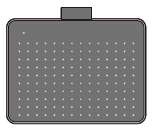 |
 |
|
|
| Wacom One Standard pen |  |
|
Available for purchase on the Wacom eStore | |
| Pen nibs |  |
|
Available for purchase on the Wacom eStore | |
| Nib removal tool |  |
|
Not available for purchase on the Wacom eStore | |
| USB-C cable | 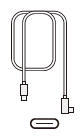 |
|
Available for purchase on the Wacom eStore | |
Use the Wacom One with Android
You can use the Wacom One with many different Android smartphones and tablets:
- Android versions 8-13: Download the Wacom Center for Android app to configure the Wacom One for use with your Android device.
- Android 14 and later: The Wacom Center for Android app is not required and should not be installed.
Note: If you are running Android 14 and later and have installed the Wacom Center for Android app, please uninstall the app.
Find more information
- See the Wacom Center Software offers page, where you can learn skills related to the software bundled with your Wacom device.
- Access FAQs and other product information on the Wacom website:
- Review the Important Product Information, which describes safety precautions, specifications, warranties, and the license agreement for your device, available in the Help & support
 section of Wacom Center.
| | Do not share my information | | Cookies | | Terms of use | | Privacy Policy |