Connect to your computer
Note: "Intuos Pro" refers to the small, medium, or large Wacom Intuos Pro.
After you have removed your Intuos Pro from the box and are ready to begin using it, complete the steps below to connect to a computer.
- Use the USB/Bluetooth selector to select the USB connection (
 ).
).
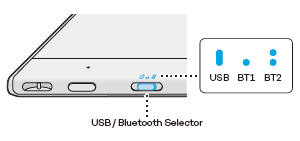
- Connect your Intuos Pro to your computer using the USB-C to A cable (or another suitable cable, available on the Wacom eStore).
- Follow the instructions on the Install the Wacom driver page.

| | Do not share my information | | Cookies | | Terms of use | | Privacy Policy |