
About the Wacom Cintiq Pro 27
Your Wacom Cintiq Pro 27 creative pen display helps you express yourself by allowing you to create directly on your screen.
- Use the customizable Pro Pen 3, which is included with your Cintiq Pro, or another supported pen.
- Interact with your device using Touch & gestures, multi-finger swipes and taps that allow you to perform actions such as switching applications or showing the desktop.
- Improve your work flow with the Cintiq Pro's eight ExpressKeys, to quickly execute frequently used actions such as mouse clicks, keyboard shortcuts, and more.
- Check out other accessories that can help you work with the Cintiq Pro, such as the Wacom Cintiq Pro 27 Stand, Extension Table, and the Wacom Color Manager. All are available from the Wacom Store.
See Features of your Wacom Cintiq Pro 27 for illustrations and information about your creative pen display. See Set up your device for setup instructions, including how to Connect to your computer.
Topics on this page
Included with your Wacom Cintiq Pro27
After you unpack your Cintiq Pro, make sure the following items are included:
| Cintiq Pro creative pen display
|
|
| USB-C to C cable | 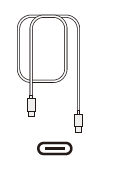 |
| USB-C to A cable | 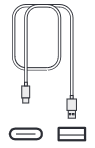 |
| Mini DisplayPort to DisplayPort cable |  |
| HDMI™ cable |  |
| Power cord |  |
| Power adapter | 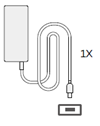 |
| Quick Start Guide booklet |  |
| Cable ties |  |
| Pro Pen 3
|
|
| Pen grips | 
|
| Pen nibs |  |
| Pen nib removal tool |  |
| Weight | 
|
| Button plates |  |
| Pro Pen 3 Tray |  |


Find more information
- Access FAQs and other product information on the Cintiq Pro Getting Started page of the Wacom website.
- Review the Important Product Information, which describes safety precautions, specifications, warranties, and the license agreement for your device, available in the Help & support
 section of Wacom Center.
| | Do not share my information | | Cookies | | Terms of use | | Privacy Policy |