Features
The controls of your Cintiq 13HD or Cintiq 13HDT include:
- Customizable ExpressKeys: Four keys on the front of the creative pen display allow you to set frequently used functions or keystrokes, simulate button clicks or modifier keys, or create automatic settings for a number of applications. See Customizing the ExpressKeys and About your Cintiq 13.
- Rocker Ring: The four-position Rocker Ring allows you to further customize your functions. See Using the Rocker Ring.
- Status LED: The Status LED should light white when the Cintiq 13HD has power and is connected to an active USB port for each of the following actions:
- Click with the tool tip
- Touch the active area with a pen, or with a pen or finger on the 13HDT
- Use the pen, Rocker Ring or ExpressKeys
- Press the button
- Press the eraser to the screen
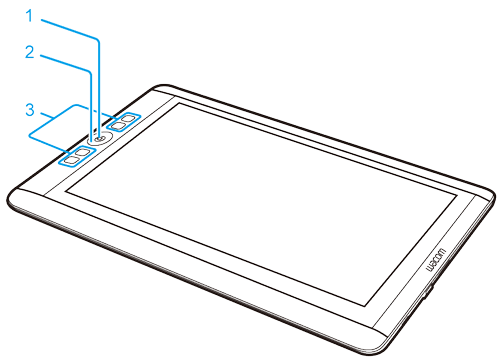
| Number | Item |
|---|---|
| 1 | Center Button |
| 2 | Rocker Ring |
| 3 | ExpressKeys |
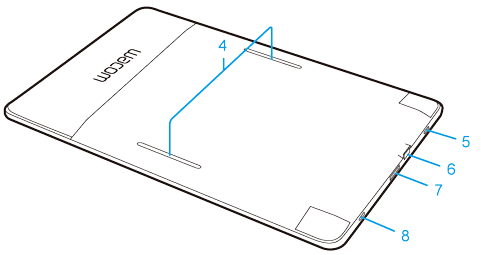
| Number | Item |
|---|---|
| 4 | Stand slots |
| 5 | Power button |
| 6 | USB port |
| 7 | Video interface port |
| 8 | Status LED |
| | Do not share my information | | Cookies | | Terms of use | | Privacy Policy |