Change the connection
Your Wacom device can connect to one wired device (computer, etc.) or wireless device at a time. When you want to switch between your connected devices, use the USB/Bluetooth selector.
- Move the USB/Bluetooth selector to select the USB-connected device (
 ) or one of the Bluetooth-connected devices (BT1
  or BT2
  )
)
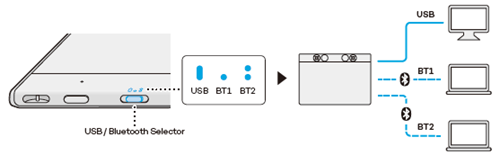
- If you previously paired a Bluetooth channel with a wireless device and you want to reconnect, open the Bluetooth menu on your wireless device and select the Wacom device name. Complete the pairing per your operating system's instructions.
| | Do not share my information | | Cookies | | Terms of use | | Privacy Policy |