Features of the DTH142E
| Number |
Item |
Description |
Image |
| 1 |
Pen holder |
Use the Pen holder to store the pen when it is not in use. |
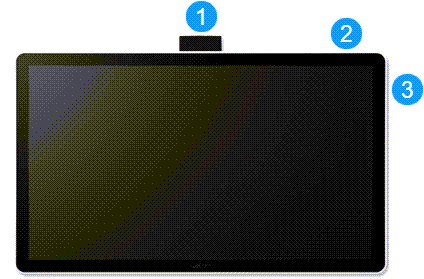 |
| 2 |
Tether hole |
Use the tether hole to attach the pen to your device. |
| 3 |
Kensington Security Slot |
Use this slot to attach a locking cable to secure your creative pen display to a specific location, such as your desk. |
| 4 |
USB-C port  |
Use this USB-C port to connect to a computer with a USB-C port that supports video output. Or, use this port to connect the AC adapter. See the connect page for details. |
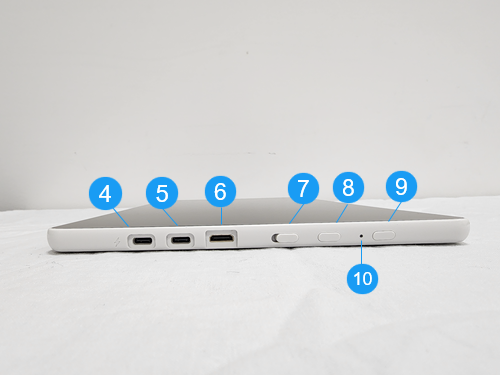 |
| 5 |
USB-C port |
Use this USB-C port to connect the USB-A to C cable. |
| 6 |
Mini HDMI port |
Use this port to connect the Mini HDMI to HDMI cable. |
| 7 |
Touch On/Off slide |
Slide this button to turn touch on and off. |
| 8 |
Menu button |
Press this button to open the Menu. |
9 |
Power button |
Press the power button to turn the device on. Use a long press to turn the device off. |
| 10 |
Status LED |
The Status LED is located between the Menu button (8) and the Power button (9) and changes based on the status of the power and pen input:
- The LED is bright white when the pen display is powered on. The LED turns soft white after 5 seconds.
- The LED is bright white when pen input is active. The LED turns soft white when the pen is hovering.
- The LED is soft white and flashes on and off when the pen display is in sleep/standby mode.
- The LED is blinking white when there is insufficient power.
- The LED is off when the pen display power is off.
|
Note: The
power adapter,
USB-A to C cable, and
Mini HDMI-HDMI cable are required if you are connecting to a computer that does not have a USB-C port that supports graphics output. Please see
Connect to your computer for more information.